
Five Network Tasks You Should Never Perform Manually Again
Network engineers have always relied on the command line. For troubleshooting, validation, and one-off changes, direct access to a device remains essential.
The problem begins when a repetitive task that worked well for ten devices is still being performed manually across hundreds or thousands of devices.
Manual network operations consume valuable engineering time, create inconsistent results, and increase the chance of configuration errors. They also make it harder to prove what changed, who changed it, and whether every device was updated successfully.
Modern network teams should not automate everything. They should automate the predictable, repetitive, and verifiable work that prevents engineers from focusing on higher-value problems.
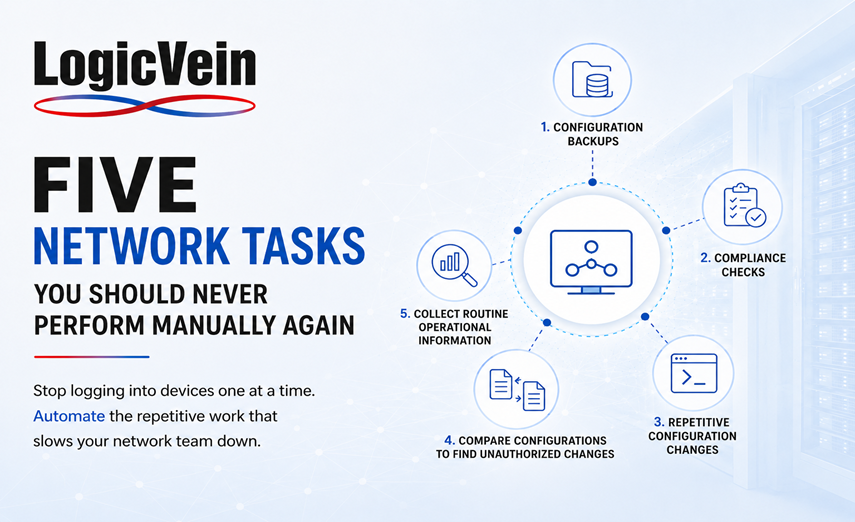
Here are five network tasks that should no longer depend on someone manually logging into devices one at a time.
1. Configuration Backups
Network configuration backups are too important to depend on memory, spreadsheets, calendar reminders, or individual engineers. A manual backup process often looks simple:
-
Connect to the device.
-
Run the appropriate command.
-
Copy the configuration.
-
Save it to a folder.
-
Name the file correctly.
-
Repeat the process for every device.
The process becomes unreliable as the environment grows. Devices are missed, files are overwritten, naming conventions become inconsistent, and no one knows whether the latest backup is actually usable.
Configuration backups should run automatically on a defined schedule and whenever a change is detected. The system should maintain version history, identify differences, and make it easy to restore a known-good configuration.
Automated backups provide more than disaster recovery. They create an operational record of how the network has changed over time.
With Net LineDancer, organizations can automatically back up configurations across multi-vendor environments, compare revisions, track changes, and quickly identify when a device has drifted from its previous state.
2. Checking Devices for Configuration Compliance
Manually checking whether devices comply with security and operational standards is slow, inconsistent, and difficult to scale.
An engineer may need to verify requirements such as:
-
Approved SNMP settings
-
Secure authentication methods
-
Correct NTP servers
-
Required logging configuration
-
Prohibited protocols
-
Standardized login banners
-
Access-control requirements
-
Password and encryption policies
Performing these checks manually means logging into each device, running multiple commands, interpreting the output, and documenting the results.
Even experienced engineers can interpret requirements differently. A manual review may also represent only a single moment in time. A device that was compliant yesterday may no longer be compliant today.
Compliance checks should run automatically against the latest device configurations. Violations should be identified consistently, reported clearly, and assigned for remediation.
Automation transforms compliance from a periodic project into a continuous operational process.
LogicVein allows teams to define configuration policies, evaluate devices automatically, identify violations, and track remediation across the environment. This provides clear evidence of compliance without requiring engineers to inspect every device manually.
3. Making Repetitive Configuration Changes
A small configuration change can become a major operational event when it must be applied across hundreds of devices.
Common examples include:
-
Updating NTP servers
-
Changing SNMP communities
-
Adding TACACS or RADIUS servers
-
Modifying login banners
-
Updating access lists
-
Disabling deprecated protocols
-
Changing syslog destinations
-
Applying interface settings
The manual approach requires engineers to connect to devices individually, enter commands, verify the results, document the change, and repeat the process.
This introduces several risks.
Commands may be entered incorrectly. Devices may require different syntax. Some devices may be skipped. Engineers may forget to save the configuration. A failed command may not be noticed until much later.
Repetitive changes should be executed through a controlled automation workflow. The workflow should select the correct devices, account for vendor differences, validate prerequisites, capture results, and report failures.
For higher-risk changes, the process should also include approval and scheduling.
LogicVein Playbooks allow teams to build repeatable workflows that include conditional logic, variables, approvals, validation steps, configuration deployment, and post-change verification.
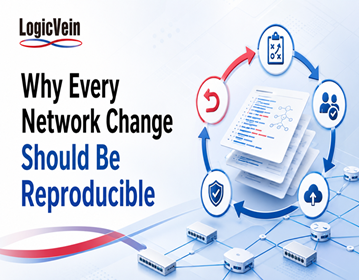
The objective is not simply to push commands faster. It is to make changes consistently, safely, and with a complete audit trail.
4. Comparing Configurations to Find Unauthorized Changes
When a problem occurs, one of the first questions is often:
What changed?
Without automated configuration tracking, answering that question may require checking ticket records, reviewing engineer notes, searching through emails, and manually comparing saved configuration files.
That takes too long during an outage.
Network teams should automatically detect configuration changes and maintain a history of every revision. They should be able to see:
-
Which device changed
-
When the change occurred
-
Which commands were added or removed
-
Whether the change was approved
-
Whether the change introduced a compliance violation
-
Whether the previous configuration can be restored
Automated change tracking reduces troubleshooting time because engineers can immediately correlate a network problem with a recent configuration modification.
It also helps detect changes made outside approved processes.
With automatic revision comparison, teams no longer need to rely on memory or manually search through configuration files. They can quickly identify the exact difference between two versions and determine whether the change was intentional.
5. Collecting Routine Operational Information
Network engineers frequently log into devices to collect information that could be gathered automatically.
Examples include:
-
Software versions
-
Device models
-
Serial numbers
-
Interface status
-
IP addresses
-
Routing information
-
Hardware inventory
-
Neighbor relationships
-
Configuration status
-
End-of-life details
This information is often copied into spreadsheets, diagrams, ticketing systems, or internal documentation.
The problem is that manually collected data becomes outdated almost immediately. Devices are replaced, interfaces change, software is upgraded, and new equipment is added.
Routine operational information should be collected automatically and maintained in a centralized system.
Automated discovery and inventory management give teams an accurate view of the network without requiring someone to repeatedly run show commands.
LogicVein ThirdEye and Net LineDancer can discover devices, collect inventory information, monitor operational status, map network relationships, and maintain current device data across multi-vendor environments.
This allows engineers to spend less time collecting information and more time using it.
Automation Should Include Validation
Automation is not simply about executing commands on more devices.
A well-designed automation process should include:
-
Device selection
-
Credential handling
-
Vendor-specific logic
-
Pre-change checks
-
Approval workflows
-
Error handling
-
Post-change validation
-
Configuration backups
-
Audit records
-
Clear reporting
Without these controls, automation can reproduce mistakes faster than a manual process.
The most effective network automation platforms combine execution with visibility, validation, and accountability.
Engineers should be able to see exactly what the automation will do, review the affected devices, approve sensitive changes, and verify the final result.
Start With the Tasks Your Team Repeats Most Often
Network automation does not need to begin with a large transformation project.
Start by identifying tasks that meet three conditions:
-
They are performed frequently.
-
They follow predictable steps.
-
Their results can be validated.
Configuration backups, compliance checks, standard changes, configuration comparisons, and inventory collection are ideal starting points because they are repetitive, measurable, and operationally important.
Automating these tasks creates immediate value. It reduces manual effort, improves consistency, and gives engineers more time to work on architecture, optimization, troubleshooting, and strategic projects.
Stop Using Engineers as Human Scripts
Experienced network engineers are too valuable to spend their days repeating the same commands across device after device.
Manual processes may feel familiar, but familiarity does not make them efficient or safe.
The goal of network automation is not to remove engineers from network operations. It is to remove repetitive work from engineers.
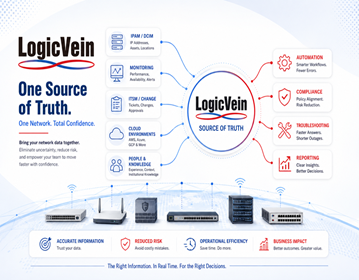
LogicVein's ThirdEye Suite combines network monitoring, configuration management, compliance, automation, topology, and reporting in a unified platform. It gives network teams the tools to replace repetitive manual processes with controlled, repeatable, and auditable workflows.
The best time to automate a task is before the next mistake, outage, missed device, or emergency change makes the decision for you.
Final Takeaway
With LogicVein, you don’t just react to changes — you control them.
Watch our series of videos here or see all our features here.
With its combination of discovery, monitoring, compliance, and automation, LogicVein transforms how IT teams manage complex network environments.
Whether you’re looking to reduce manual work, improve network reliability, or gain better visibility into device configurations, LogicVein will provide you the tools you need—all in a single platform.
Ready to see LogicVein in action? Request a Demo and discover how you can simplify operations, improve reliability, and gain full network visibility.