badge
Three Minds, One Way

We focus on the big picture, and we start with the small picture. In our work, the “three minds” matter most: a steady mind, a caring mind, and a broad mind. Be kind to others, be kind to yourself, and stay deeply concerned with the truth.

The devil of work is in the details. What seems difficult can be made easy; what seems easy deserves extra care. Before we think about profit and loss, we apply a filter for what is good and what is not. Work is the reward for challenge and effort.

True service is helping people do the impossible—right away. Action and wisdom must always work together. Wisdom sets the direction; decisive execution makes it real. Be logical and calm in your work, and warm and human at heart.

netLD for MSPs

Standardize customer network operations without flattening every customer into the same network.

Managed service providers rarely struggle because one customer network is hard to manage. The hard part is repeating safe work across many customer environments, especially when IP ranges overlap, access needs to be delegated, and every change needs an audit trail.

netLD gives MSP teams a shared operating model for configuration backup, change control, automation, secure terminal access, per-customer access boundaries, reporting, and customer separation.

netLD managed service provider operations interface

Built for Real MSP Network Operations Challenges

MSP operations create a specific kind of complexity: the same private address space appears in multiple customers, change windows are repeated across similar devices, engineers need access without spreading device credentials, users need different permissions by customer or region, and customers expect evidence when something changes.

netLD is built around those operating realities. SmartBridge keeps customer environments separated while allowing centralized management. Think of Networks in netLD and ThirdEye like drawers in a cabinet: each drawer can hold its own devices and credential set, and users can be assigned roles for that drawer without inheriting the same access everywhere else. SmartChange turns repeatable changes into controlled workflows. Terminal Proxy gives engineers access while keeping sessions searchable and accountable.

Deploy Where Your Network Lives

Run LogicVein as a self-hosted virtual appliance in your vCenter, OpenStack, or Hyper-V environment, or host it inside private AWS or Azure cloud networks. Keep network operations close to your devices, security boundaries, and operating model.

netLD for MSPs

Watch how netLD helps managed service providers separate customer environments, support overlapping networks, control repeated changes, and keep terminal access auditable.

netLD Enterprise video preview Video play button

Tools and Features

  • SmartBridge: Handle Overlapping Subnets
  • SmartChange: Apply Unique Changes to Multiple Devices
  • Terminal Proxy: Automatic Device Login
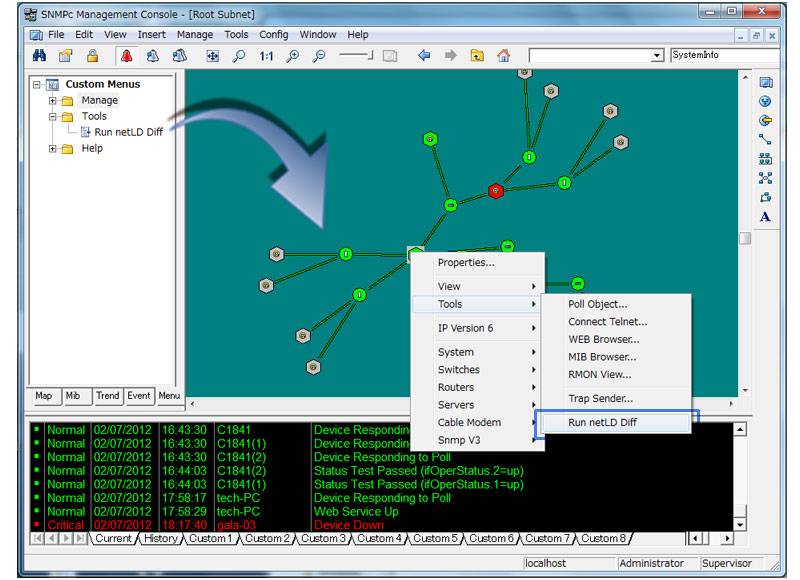
  • Integration with NMS
  • Data Export & Import
  • Custom Fields: Create and Edit 5 Fields for Custom Sorting
  • User Access Control
  • Reporting: Complete Hardware Inventory (Slots & Daughter Cards)
  • Advanced Device Search

SmartBridge: Handle Overlapping Subnets

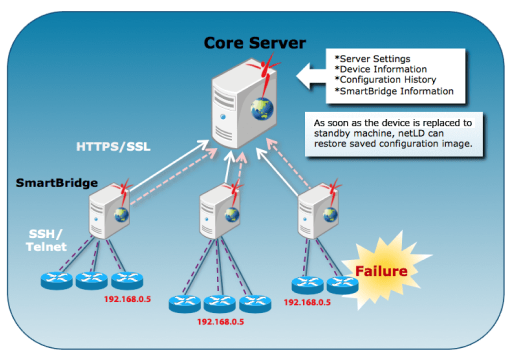
Place a SmartBridge at each of your locations and manage them centrally from the core netLD server. This enables management of devices with duplicate (routing domain) IP addresses and reduces bandwidth usage between remote networks and the core netLD server.

SmartBridge topology diagram

Distributed Architecture

SmartBridge handles configuration backups, changes, and transfers locally—sending only detected changes to the core server. This greatly simplifies securely managing devices across NATs and discrete networks.

Uniform Management

All information is stored in the core server, so nothing is lost if a SmartBridge experiences issues. Only the core server needs to be backed up.

Software Updates

When the core server software is updated, all linked SmartBridges automatically update as well.

SmartChange: Apply Unique Changes to Multiple Devices

SmartChange parameterized bulk change screen

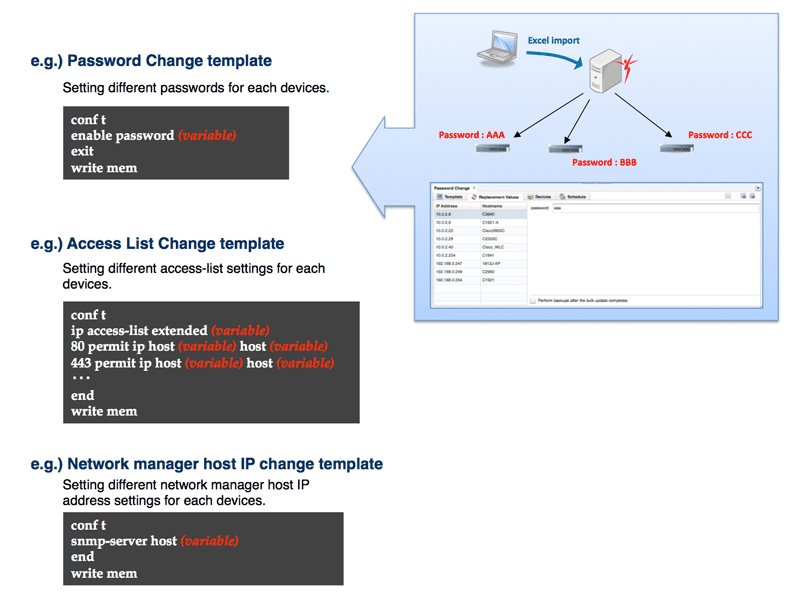
Net LineDancer provides a parameterized, template-based mechanism for executing sets of changes across many devices. Create a template once, then apply it at scale—even when each device requires small value differences. Reuse SmartChange for recurring tasks (like rotating passwords or updating access lists) by supplying new parameters at run time.

Terminal Proxy: Automatic Device Login

Terminal Proxy SSH workflow diagram

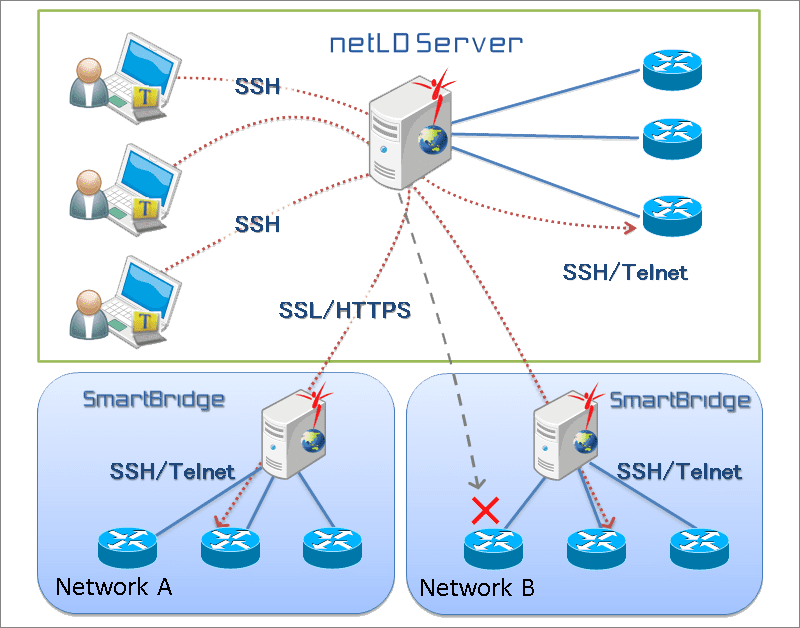
netLD provides an SSH server for easy, secure terminal access to all devices in your inventory. Log in to netLD, then jump to target devices with automatic authentication. All sessions are recorded and searchable, including who accessed which device, when, and which commands were run.

Integration with NMS

Integration with network monitoring systems

Net LineDancer integrates with network monitoring and management systems, emitting notifications for configuration changes, backup failures, and compliance violations. Correlate monitoring alerts with the actual changes that occurred on the network.

Data Export & Import

Export data from netLD, make edits, and import it back for rapid at-scale updates. Available import/export capabilities include:

  • Device inventory (including configurations)
  • Device credential configuration
  • Tool result output
  • Bulk update settings
  • Cisco Plug and Play (formerly Zero-Touch) configuration*

*Zero-Touch was renamed to Cisco Plug and Play starting with Net LineDancer v14.06.

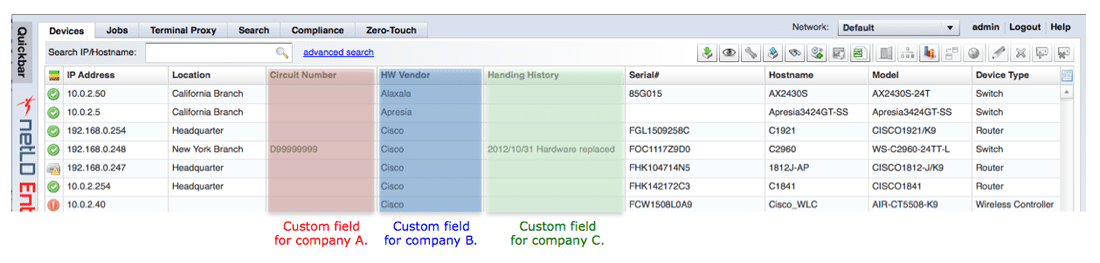
Custom Fields: Create and Edit 5 Fields for Custom Sorting

Custom fields configuration in netLD

Each device supports up to five custom fields for attaching business context or operational metadata. These fields are fully searchable, and per-field read/write permissions can be configured per user.

User Access Control

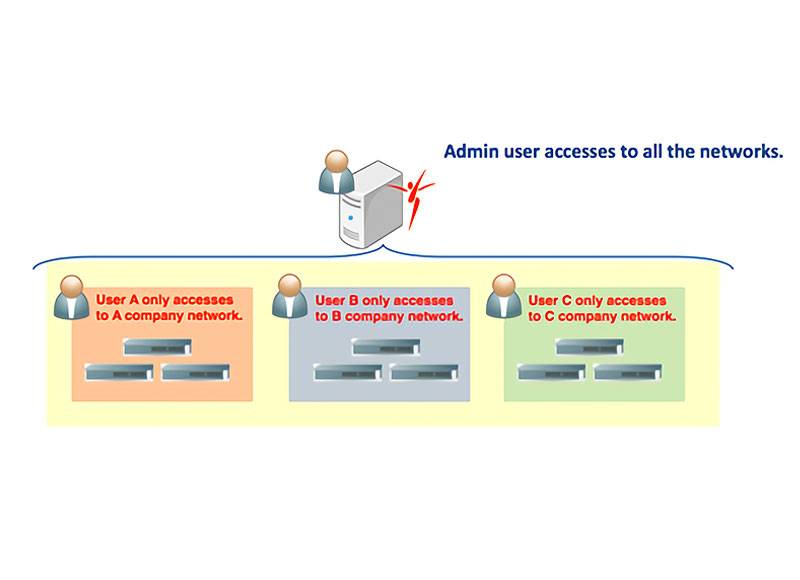
Granular role-based access control settings

Define user roles with granular permissions to precisely control who can view, change, approve, and deploy configurations across your environments.

For MSP and segmented environments, netLD Networks can each have their own credential set. Users can then be assigned roles on a per-Network basis, giving teams a practical way to separate customer, regional, or operational domains without creating a different operating model for each one.

Reporting: Complete Hardware Inventory (Slots & Daughter Cards)

Generate reports across devices, inventory, and configurations. Create per-customer reports or focus on subsets of your inventory, including detailed hardware views such as chassis, slots, and daughter cards.

Make Managed Network Services Repeatable

Separate Customers Without Splitting the Operating Model

MSP teams need clear boundaries between customer environments, but they also need one consistent way to work. SmartBridge supports distributed and overlapping networks while keeping management centralized, so engineers can operate across customers without losing tenant context.

Give Engineers the Right Access for Each Network

netLD Networks can represent customer environments, regions, operating domains, or other managed boundaries. They work like drawers in a cabinet: each Network can hold its own devices and credential set, and users can receive roles per Network, so an engineer can have the right permissions for one customer without inheriting the same access everywhere else. Network restrictions provide the product-level model behind that separation.

Control Change Across Repeated Environments

Many MSP changes are variations on a pattern: update an ACL, rotate credentials, adjust access, fix a template, or apply a standard across a set of similar devices. SmartChange helps turn that work into parameterized, repeatable workflows instead of one-off CLI sessions.

Keep Access Accountable

Terminal Proxy gives engineers a controlled path into managed devices without distributing customer credentials. Sessions are recorded and searchable, creating a useful history for troubleshooting, customer questions, and audit review.

Turn Service Delivery Into Evidence

Configuration backups, change history, compliance checks, inventory, and reports help MSPs show what was managed, what changed, who changed it, and what was restored. That evidence matters when customers ask what happened during an incident or what was completed during a maintenance window.

The goal is not just to manage more devices. It is to make managed network services easier to repeat, easier to prove, and easier to scale.

30 Day Free Trial

Understand, monitor, and control your network with ThirdEye, free for 30 days.

Start Your Trial