
Automating Meraki Asset Discovery and Remote Configuration Without Relying on the Meraki Dashboard UI
If you manage Meraki gear across more than a handful of sites, you already know the drill. A new guest Wi-Fi policy needs to roll out to 40 retail locations. A firewall rule has to change on every branch's security appliance before Friday. A single misconfigured SSID at one store turns into a support ticket, then a scramble to check whether the other 39 have the same problem.
The Meraki Dashboard makes any one of those changes easy. It's the fortieth one - done correctly, in the same way, without missing a device - that turns a five-minute task into an afternoon of clicking through networks one at a time.
LogicVein's built-in Cloud Discovery Engine already solves half of this problem today: native, read-only discovery of your entire Meraki estate via the Dashboard API. The other half - actually pushing a change back out, consistently, across however many devices need it - is what LogicVein's Playbooks are for.
LogicVein Already Knows Your Meraki Network
The moment a Meraki organization is connected to LogicVein, there's nothing left to inventory by hand. LogicVein pulls organizations, networks, and devices directly from the Meraki Dashboard API - every Z-series security appliance, every MR access point, every SD-WAN appliance, every network they belong to, kept current automatically. No spreadsheet of device names and serial numbers to maintain alongside the Dashboard. No guessing whether a network ID you copied down last quarter is still accurate.
That discovery data isn't just for reporting. It's the exact list a Playbook draws from when it's time to act.
Discovery Is Only Half the Story
Knowing that a device exists - and knowing its configuration is out of date - doesn't fix anything by itself. Someone still has to open the Dashboard, find the right network, and make the change. Multiply that by every store, branch, or site in the deployment, and "someone" is spending a day doing something a script could finish in minutes, with none of the risk of a fat-fingered CIDR range or a device that got skipped because the tab got closed.
That's the gap Playbooks are built to close.
Playbooks Close the Loop
A LogicVein Playbook can select any set of devices straight out of that same discovery data - by name, by tag, by site - and hand each one to a custom script running on an SSH Exec or Script node. For Meraki, that script talks directly to the Meraki Dashboard API using Cisco's official Python SDK, so every change goes through the same supported interface the Dashboard UI itself uses.
The key design point: a Playbook only ever needs a device's hostname - the same hostname LogicVein already discovered. The script resolves that hostname to its parent Meraki network (and, for wireless, the right SSID) automatically. Nobody has to look up or hard-code a Meraki network ID anywhere in the Playbook.
What It Actually Does
The initial use cases targeted by LogicVein cover the two configuration areas that come up frequently in Meraki deployments:
- Layer 3 and Layer 7 firewall rules on Z-series security appliances - apply a full rule set to one device, a batch of devices, or an entire network in a single Playbook step.
- Per-SSID Layer 3 and Layer 7 firewall rules on MR wireless access points - since firewall policy on Meraki wireless lives on the SSID, not the access point itself, the script resolves which SSID you mean by name or number before it touches anything.
Around that core, it adds the guardrails you'd want before trusting any automation with production firewall rules:
- Export before you edit - pull a network's current rules as a ready-to-use starting point, instead of hand-writing JSON from a blank file.
- Dry-run everything - preview exactly what would change, diffed against the live configuration, before anything is actually applied.
- Idempotent apply - re-running the same change twice is a no-op the second time, not a duplicate rule.
- One-call rollback - clear a device's rules back to Meraki's defaults without reconstructing the "before" state by hand.
- Self-documenting changes - optionally write a compact rule-count summary straight into the device's Dashboard Notes field, so the change is visible in the Meraki UI itself (and in the LogicVein inventory), not buried in a separate log only automation engineers ever open.
A Day in the Life
Picture a retail chain rolling out a new guest-network firewall policy: block guest Wi-Fi from reaching the internal LAN, block a couple of known-bad hosts, and block peer-to-peer traffic - across every store in the region.
Without automation, that's a network engineer opening the Dashboard, finding each store's network, finding the right SSID, and re-entering the same three rules by hand, store by store, hoping nothing gets fat-fingered along the way.
With a Playbook, it's:
- LogicVein discovery already knows every access point tagged for that region - no separate device list to build.
- The Playbook selects them and hands each one, by hostname, to the Meraki script alongside the desired rule set.
- A dry-run pass reports exactly what would change at every store, with zero risk, before anything is touched.
- The real run applies it everywhere, confirms the result by reading the rules back from Meraki (not just trusting the API said "OK"), and writes a summary to each device's Notes field.
What used to be a multi-day rollout, and a real chance of a missed or mistyped store, becomes one Playbook run and a few minutes of review.
Under the Hood: What the Playbook Actually Looks Like
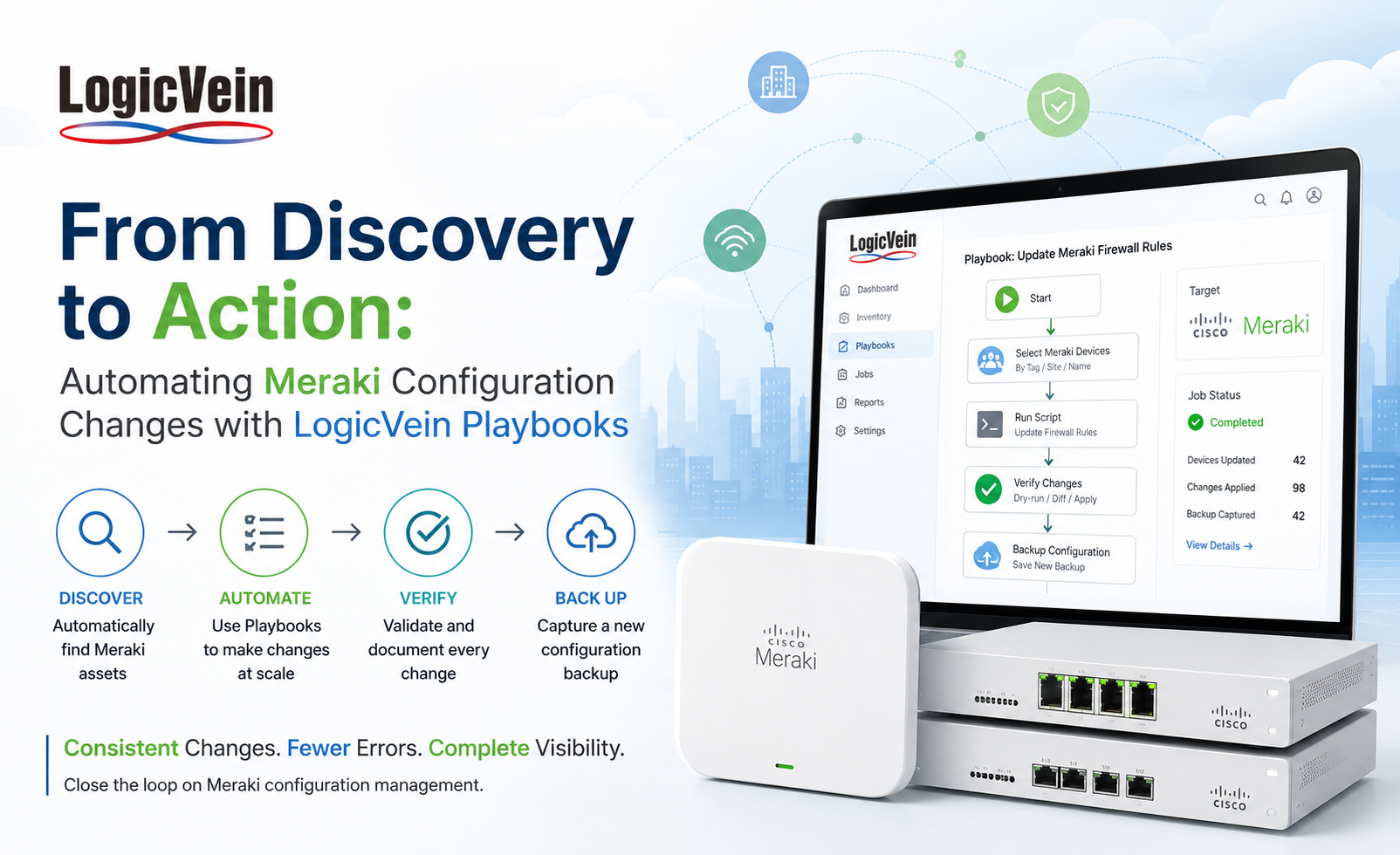
Strip away the specific rule set and this is a four-node Playbook:
- Device Search - pulls the target list straight from LogicVein's own discovery data (for example, "every Meraki Z-series device"). No manually maintained inventory to keep in sync.
- Set Variables - holds the desired L3/L7 rule set as JSON.
- SSH Exec - Apply Firewall Rules (a Script node works just as well here) - runs the Meraki script against the selected device, applying the rule set directly.
- Backup Device - immediately pulls a fresh configuration snapshot, the same native Config Backup capability LogicVein already runs for every managed device.
That last step is what actually closes the loop. Because the Meraki script optionally writes its change summary into the device's Dashboard Notes field, the very next config backup LogicVein pulls captures that summary as part of the device's own discovered record - right alongside its firmware version, serial number, and every other detail LogicVein already tracks. The "who changed what, and when" story doesn't live in a separate automation log someone has to remember to check. It's sitting in the same discovered device record LogicVein already shows you.
Why This Matters
- Speed - bulk configuration changes across many devices in a single run, instead of one Dashboard session per device.
- Consistency - every targeted device gets exactly the same rule set, with no manual transcription drift between stores.
- Safety - dry-run and diff-before-apply mean nothing changes silently, and idempotent behavior means re-running a Playbook is never destructive.
- Auditability - the Notes-field summary isn't just visible in the Meraki Dashboard, it flows straight into LogicVein's own native Config Backup on the very next pull, so the change trail lives in the same discovered device record you already use, not a separate log.
- No new workflow to learn - it's the same "discover, select, run a Playbook" model teams already use for every other vendor LogicVein supports.
Key Takeaways
- LogicVein's Cloud Discovery Engine means discovery is automatic and always current - no manually maintained device lists.
- Playbooks turn that read-only visibility into read-write control, closing the loop between "we know what's out there" and "we fixed what's out there."
- Firewall configuration - the change that's hardest to do consistently by hand across many devices - is exactly the kind of task Playbooks were built to take over.
- Dry-run previews, idempotent applies, and Dashboard-visible change summaries mean automation doesn't come at the cost of confidence in what actually changed.
- Chain a Config Backup step onto the same Playbook and the change trail writes itself - the next discovered device record already shows what changed and when.
Manual, per-device configuration doesn't scale past a handful of sites - and it's exactly where mistakes hide. LogicVein Playbooks turn Meraki discovery into Meraki action, without adding a second tool or a second workflow to your team's day.
Final Takeaway
Meraki makes individual configuration changes easy. LogicVein Playbooks make those same changes practical at scale.
By combining automatic Meraki discovery with repeatable Playbook automation, teams can identify the right devices, preview changes, apply them consistently, verify the results, and immediately capture a new configuration backup—all within the same LogicVein workflow.
Whether you're managing ten Meraki sites or hundreds, the goal is the same: fewer repetitive changes, fewer opportunities for mistakes, and a clear record of what changed.
Ready to see how LogicVein can automate your Meraki environment? Request a Demo
Watch our series of videos here or see all our features here.