
Automating Network Operations with LogicVein Playbooks: Real-World Use Cases That Actually Matter
Most “network automation” content sounds great in theory—but falls apart the moment you try to operationalize it.
The problem isn’t automation itself. It’s the lack of structured, repeatable workflows that reflect how engineers actually work.
That’s where LogicVein Playbooks stand out.
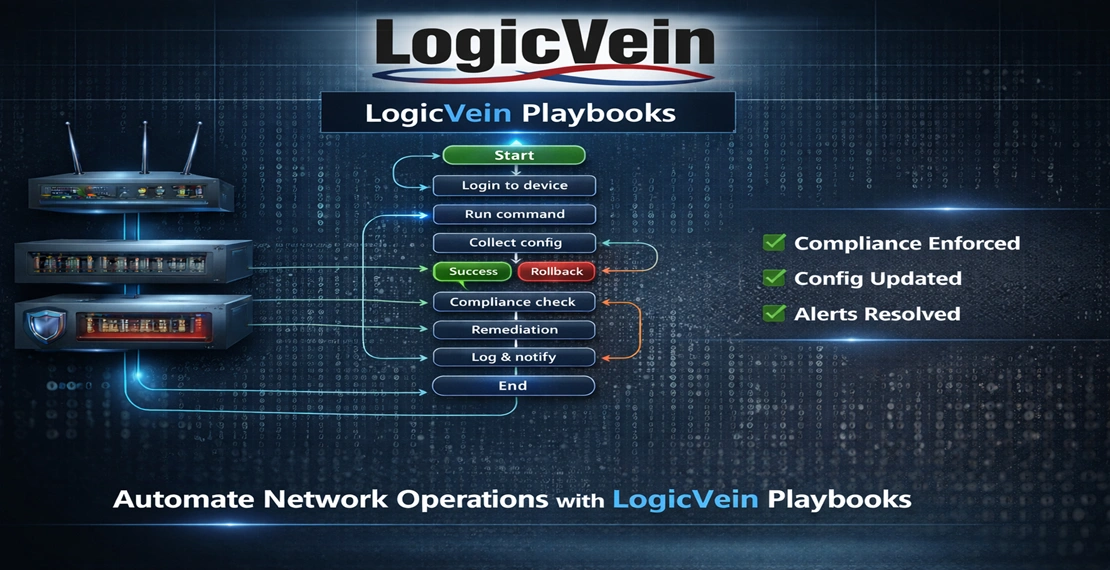
Instead of scripts scattered across jump boxes or brittle one-off tools, Playbooks provide a visual, controlled workflow engine that mirrors real operational processes—complete with validation, branching logic, and built-in error handling.
Why Most Network Automation Fails
Let’s be blunt:
- Scripts don’t scale
- Runbooks drift from reality
- Engineers bypass automation when it slows them down
- Error handling is usually an afterthought
What’s missing is workflow orchestration.
LogicVein Playbooks solve this by treating automation like a decision-driven process, not just command execution:
- Each step is a node
- Each decision is validated (regex, conditions, results)
- Every outcome is tracked and reported
Use Case #1: OS / Firmware Upgrades (Where Automation Actually Pays Off)
Firmware upgrades are one of the most error-prone and operationally expensive tasks in network operations.
A typical workflow includes:
- Check current OS version
- Validate install mode (INSTALL vs BUNDLE)
- Verify flash space
- Upload image
- Validate MD5 checksum
- Execute upgrade
- Reload device
- Confirm version
- Notify team
This is exactly the type of process LogicVein Playbooks are designed to automate.
The Problem with Manual Execution
Even experienced engineers encounter issues:
- Wrong image version
- Corrupted uploads
- Devices in incorrect mode
- Inconsistent upgrade results
How Playbooks Solve This
Playbooks convert this into a self-validating workflow:
Pre-checks prevent unnecessary work
- Run
show version - Compare against target version
- Abort if already compliant
Mode validation eliminates risk
- Detect INSTALL mode via regex
- Abort if device is not ready
Intelligent file handling
- Check if image already exists (
dir flash:) - Skip upload if present
- Clean flash automatically when needed
Integrity verification
- Validate MD5 checksum before installation
Controlled execution
- Only proceed when every step succeeds
Deterministic outcomes
Every execution ends in:
- Success
- Failure
- Aborted
Each outcome is clearly reported.
Use Case #2: Reusable, Parameter-Driven Playbooks
One of the most powerful features of LogicVein Playbooks is variable-based design.
Instead of hardcoding values, define:
Target FilenameMD5 ChecksumTarget Version
Why This Matters
Without variables:
- Playbooks become one-off scripts
- Updates require editing logic
- Risk of human error increases
With variables:
- Playbooks become reusable
- Updates are centralized
- Engineers avoid touching core workflow logic
This is how teams move from scripts to scalable automation frameworks.
Use Case #3: Conditional Logic That Reflects Real Networks
Real networks are unpredictable. Automation must adapt to real-time conditions.
Playbooks use branching logic based on device state:
- If version matches → abort
- If file exists → skip upload
- If checksum fails → stop
- If upload fails → trigger error handling
This eliminates:
- Blind execution
- Incorrect assumptions
- Risky bulk operations
Every step becomes state-aware and validated.
Use Case #4: Built-In Error Handling and Notifications
Most automation breaks when something goes wrong.
Playbooks are designed for failure scenarios:
- Every branch sets a result message
- All paths converge into a final notification step
- Email/Webhook nodes provide immediate feedback
What You Gain
- Visibility into exactly where a failure occurred
- Clear operational feedback
- Faster troubleshooting
This is not just automation—it’s operational intelligence.
What This Means for Your Network
Most teams don’t struggle with automation tools.
They struggle with:
- Trusting automation
- Scaling it safely
- Maintaining it over time
LogicVein Playbooks address all three:
Trust
Every step is validated and controlled
Scale
Workflows are reusable and parameterized
Maintainability
Logic is visual and structured—not hidden in scripts
The Shift: From Scripts to Workflows
The key takeaway isn’t just automation—it’s how you approach it.
Stop thinking in commands.
Start thinking in workflows.
That shift is what separates:
- Automation experiments
from - Production-ready network operations
Final Thoughts
If your current automation still requires:
- Manual verification
- Tribal knowledge
- Constant monitoring
…it’s not automation yet.
LogicVein Playbooks turn operational processes into:
- Repeatable workflows
- Enforced guardrails
- Observable outcomes
That’s where real efficiency—and reliability—begins.
Download the Playbooks use cases white paper (PDF)
📌 Final Takeaway
With LogicVein, you don’t just react to changes — you control them.
Watch our series of videos here or see all our features here.
With its combination of discovery, monitoring, compliance, and automation, LogicVein transforms how IT teams manage complex network environments.
Whether you’re looking to reduce manual work, improve network reliability, or gain better visibility into device configurations, LogicVein will provide you the tools you need—all in a single platform.
Ready to see LogicVein in action? Request a Demo and discover how you can simplify operations, improve reliability, and gain full network visibility.